Automated CRM with n8n: four tools, one workflow.
A hands-on experiment that connects Notion, an AI model and Brevo through n8n to run an email sequence with an initial message and two follow-ups.
- n8n
- Notion
- AI model
- Brevo
- Marketing automation
Why this project?
Handling sales communications with separate tools means repeating the same steps over and over: looking up the contact’s details, drafting the message, sending the email and noting what was done. Every manual step costs time and is a chance for error.
We chose this process as a test bed to study how different applications can work together in a single automated flow.
The goal of the demo
Build a sequence with an initial message and two follow-ups, checking how data moves between different tools and how AI can be used to draft the copy.
Architecture and technologies
n8n
Orchestrates the whole flow and starts the operations with a scheduled trigger.
Notion
The database the flow reads contacts from and updates records in.
AI model
Drafts the message copy from the contact’s data.
Brevo
Sends the transactional emails.
The workflow steps
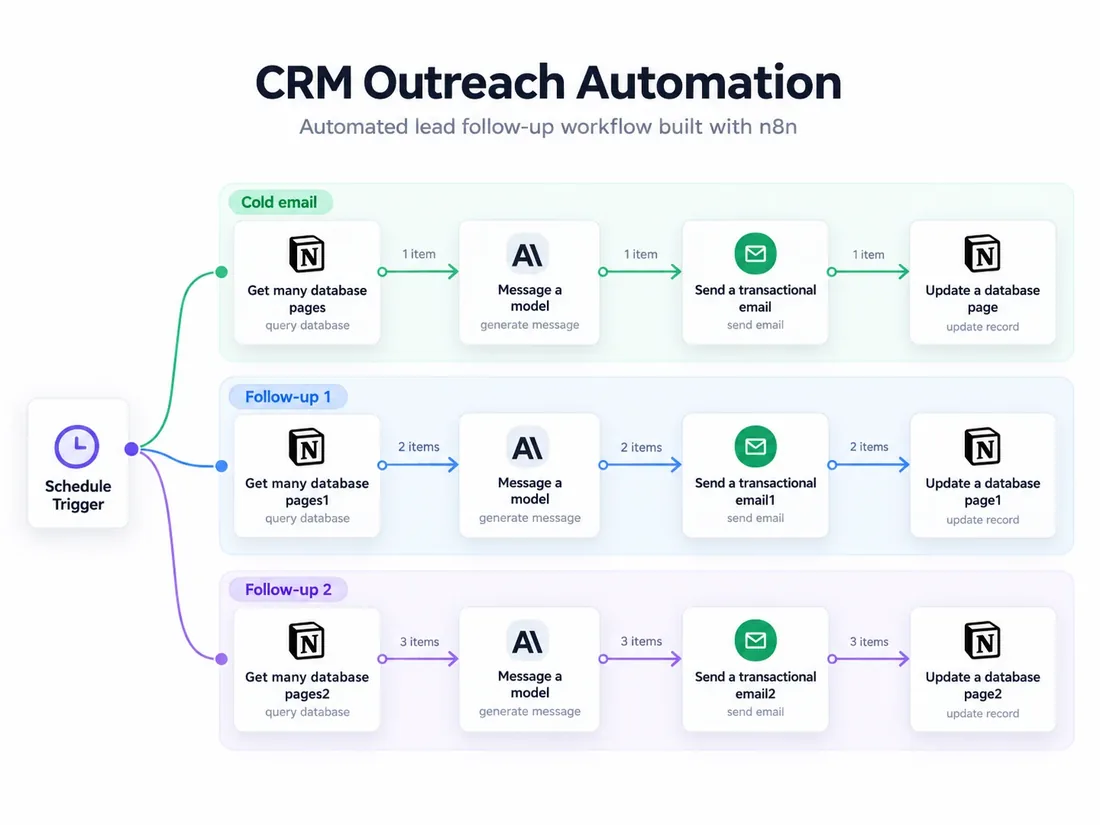
The trigger starts three paths, one per stage: initial email, follow-up 1 and follow-up 2. Each path runs the same four operations:
- 01
Data retrieval
The workflow reads the contacts’ data from the Notion database.
- 02
Message processing
The AI model generates the email copy.
- 03
Sending
Brevo sends the email.
- 04
Update
The workflow updates the information in the relevant Notion records.
Controls and limits
A prototype and a system ready for real use are not the same thing. Before applying a flow like this to real contacts, you need:
- human review of the generated copy, at least at the start;
- error and retry handling, with alerts when a step fails;
- sending limits and a searchable log of operations;
- least-privilege permissions on connected accounts and protected credentials;
- a check of the legal basis for the communications and a working unsubscribe.
Transparency: this is not a solution built for a client. We do not claim revenue increases, savings or percentages we have not measured.
What it shows and how it can evolve
The project documents a first hands-on experience: designing a workflow, connecting APIs, using an AI model and managing a sequence of coordinated operations.
The same logic (read data, process it, act, record) applies to other business processes, such as handling orders and documents. The next steps are the controls listed above and a real case to measure with before-and-after numbers.