CRM and contacts
Reading and updating records across different tools, without copying data by hand.
Business tasks move across different software, data that needs updating and repetitive operations. Business process automation connects these pieces and uses artificial intelligence only where it is truly needed.
Automating a process means letting a system carry out the repetitive steps between one application and another: reading a piece of data, transforming it, entering it where it belongs and notifying the right people.
Traditional automations are often enough for clear rules and structured data. AI comes into play when the data is free text, such as an email, a PDF or a request that needs interpreting. The choice depends on the problem, the quality of the data and the controls available.
Typical examples, especially in manufacturing companies. The first two cards have already been tested in our demo project; the others are areas under analysis.
Reading and updating records across different tools, without copying data by hand.
Communication sequences with defined sending conditions and copy drafted with AI.
Orders received by email or PDF, read by AI and turned into a draft to check in your management software.
Collecting, checking and filing delivery notes, confirmations and certificates.
Periodic reports generated from Excel or your management software instead of being filled in by hand.
Connecting applications that don’t exchange information today.
Orchestrates the events, conditions and actions of the process.
Let tools and platforms exchange data with each other.
Process text and information when it makes sense.
Handle errors, permissions, human oversight and data protection.
The demo workflow brings together Notion, an AI model, Brevo and n8n: it retrieves information, drafts messages, sends emails and updates records.
It is a technical demo, not a commercial solution with measured benefits.
Explore the project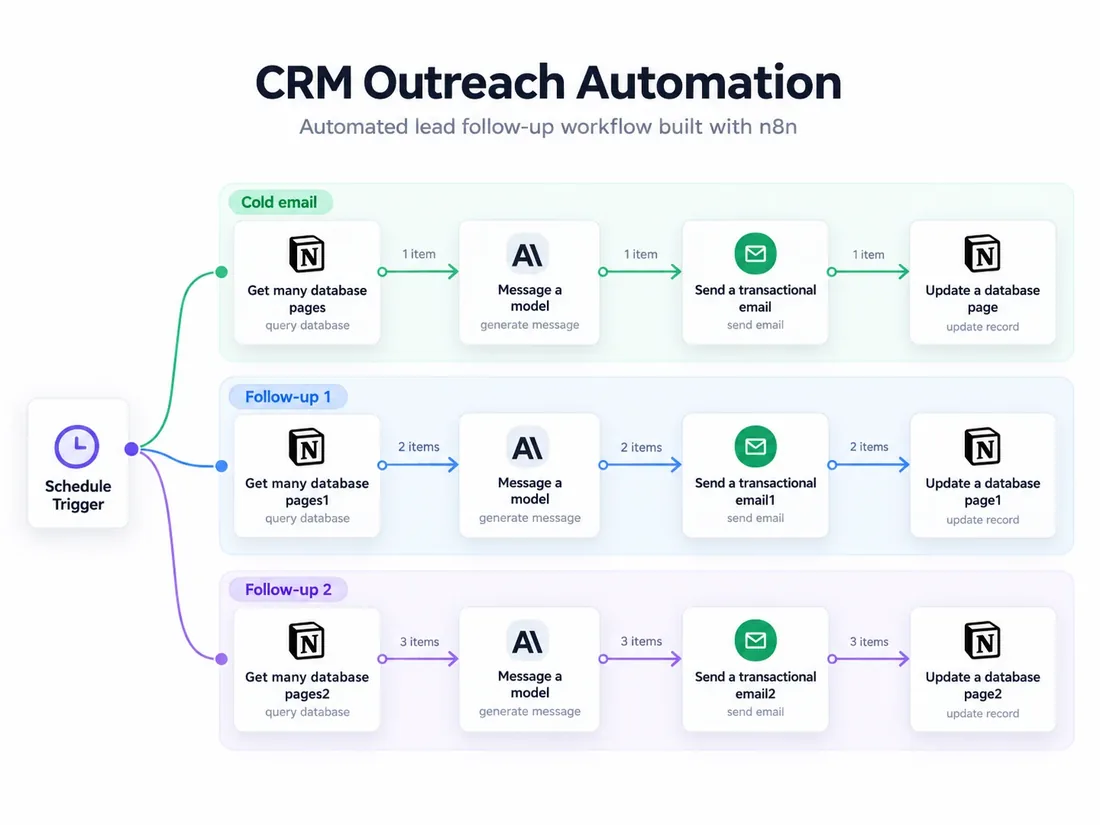
We start from the tools you already use and the tasks you would like to improve.